I still have a few minor things to fix, like doing a graphical version of the blog title. But all the major glitches seem to be ironed out, so I hereby declare this blog open, and I will now go tell people about it. 🙂
Blog
-
DTL OTMaster, a new font investigation/fixing tool
So, my old friend Frank Blokland over at the Dutch Type Library recently asked me to take a look at a new tool they were developing. DTL has a whole suite of tools collectively known as DTL FontMaster. OTMaster (OT being short for OpenType), along with its free “Light” version, is a new addition to this suite, and has just shipped.
Basically, OTMaster is a tool for cracking open and looking inside OpenType fonts (or plain old Windows TrueType fonts). It shows a fairly literal/direct representation of what’s in the various tables and subtables. It has a bit of unobtrusive interface and allows direct editing of various fields. This is an excellent tool for font geeks/developers, but not really appropriate for the average end user of fonts.
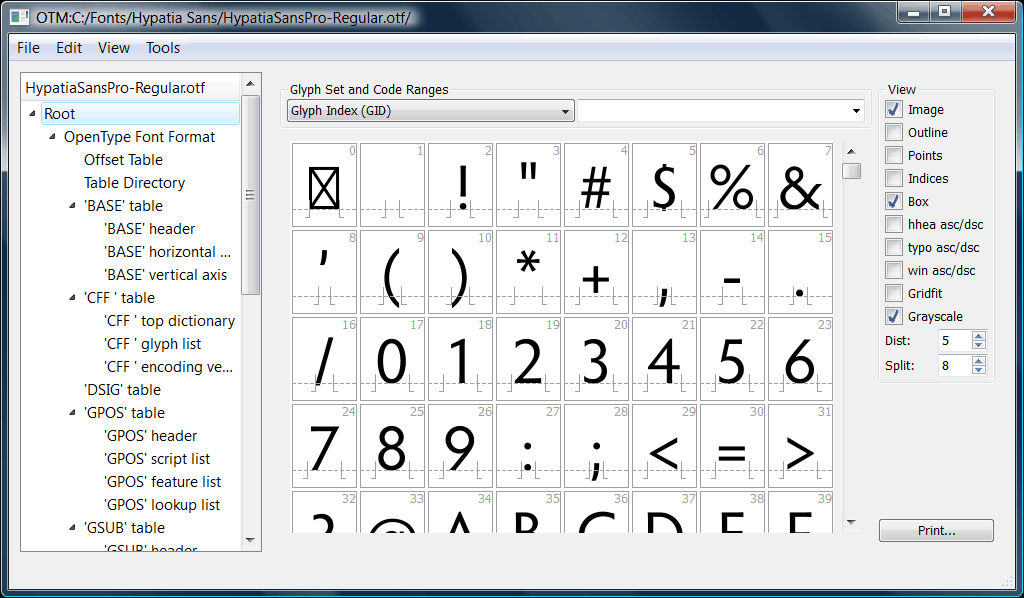
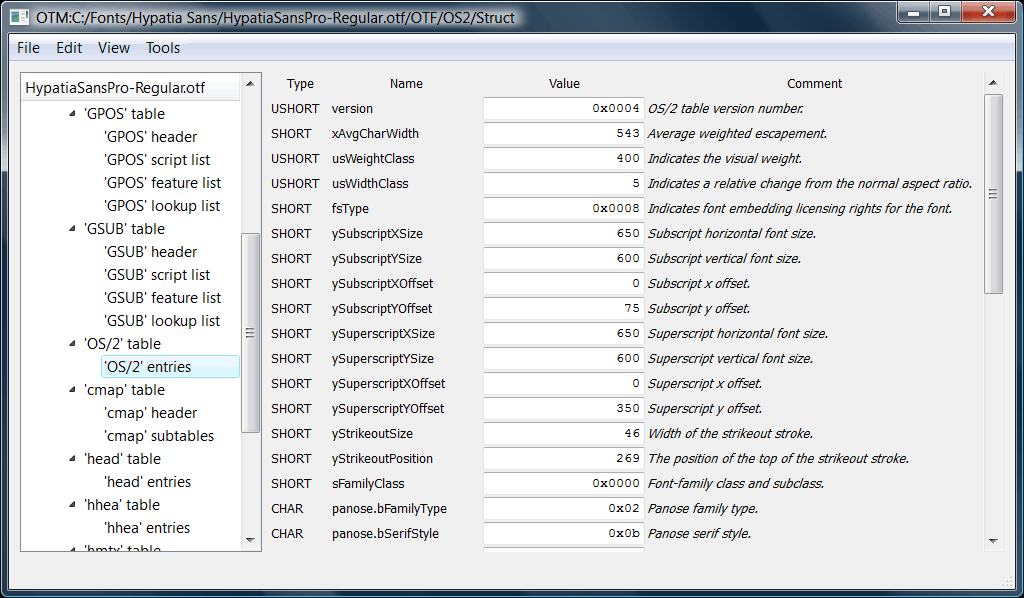
Here are a couple of screen shots (click on each for full size version):
OT Master glyphs display
OT Master display of OS/2 table
Currently, if I want a simple and accurate representation of the contents of a TrueType or OpenType font, and possibly to edit the info, I have been using the wondrous open source TTX tool, which is based on the FontTools library. This dumps the font info to an XML text file, which can be viewed/edited in any text editor or anything that can handle XML. It can also recompile the text file back into a font. (In fairness, Adobe’s FDK for OpenType also has table dumping/recompiling tools, just not quite as slick as TTX. Even Adobe folks often use TTX.)
Why would I use either OTMaster or TTX instead of, say, FontLab Studio 5? FLS is a great program which I use a lot, but it interprets the OpenType font into its own internal format. It can’t open a font, make a tiny change and re-save it as a font without potentially changing other things. To give a really concrete example, FLS displays font embedding settings in terms of its interpretation of the settings, rather than the actual bits. So if I’m looking at a font with a bogus/illegal embedding setting, I can’t tell, because FontLab won’t show me that, it’ll just default to showing the end result as some legit setting instead. So tools like TTX or OTMaster are really handy for that, because they show the unvarnished truth of what’s in the font, without interpretation.
The downside to tools like TTX and OTMaster is that they make little effort to tell you the meaning of the various cryptic values for various fields (or the exact meaning of the field itself), even when said values are legal/legit. So you need to also have a copy of the OpenType or TrueType specification handy, and optionally a more descriptive, hand-holding tool like FontLab Studio (though one must beware the possibility of it adding or reinterpreting data, as mentioned).
Here’s the public announcement DTL made for OTMaster, on the ATypI mailing list (a great resource, and a major benefit of ATypI membership):
The Dutch Type Library and URW++ Design & Development proudly present DTL OTMaster (OTM), a highly sophisticated application for reviewing, editing and saving tables of fonts with a snft file structure, as there are CFF and TTF flavored OpenType fonts, TrueType fonts and TrueType Collection fonts.
Font editors, like for instance the DTL FontMaster suite, FontLab Studio and FontForge, rely on their own internal data formats for type design and font production. From these data, binary fonts for the end-user are compiled as the last step in the font production process. OTM is a tool for inspecting and adjusting such binary fonts, irrespective of the font editor used for their creation.
OTM makes the editing of tables possible from a graphical user interface. It comes with built-in tools like the Glyph Editor for proofing and editing contours or even drawing glyphs from scratch. A ‘kern’ Table Viewer is available for proofing and refining the kerning, and a ‘GSUB’/’GPOS’ Viewer to visually test (and in case of GPOS also adjust) these OpenType Layout tables.
DTL OTMaster was programmed in Hamburg, Germany at URW++ Design & Development, renowned for pioneering in the field of font technology development for more than thirty years. The FM Team (Dr. Juergen Willrodt, Axel Stoltenberg, Hartmut Schwarz, Peter Rosenfeld and Frank E. Blokland) was joined by Karsten Luecke as advisor and also author of the extensive and detailed OTM manual and Nikola Djurek for the design of the function icons.
OTM is available for Mac OS X, Windows and Linux. Free Light versions are available for:
The downloads also contain the OTM manual in PDF format.
-
Unable to install OpenType .otf & PostScript Type 1 fonts?
Sometimes folks can’t install any OpenType CFF (“.otf”) or Type 1 (a.k.a. “PostScript”) fonts on a Windows computer. There are (at least) four known causes for this. (The new outbreak of problem #4 below spurred me to write them all up.)
- What version of Windows is the user running? If a really ancient version (Windows ME, Windows 98, Windows 95, or Windows NT 4), then they need to install ATM (Light) on their computer. Note that Windows NT 4 uses a different version than Windows 98/ME. Type 1 and OpenType CFF fonts simply will not work on these operating systems without ATM.
- One common source of this problem in the past was if the user uninstalled ATM (Light or Deluxe) without first updating/patching things properly. This problem can occur on Windows 2000, XP and Vista. Adobe has had a simple fix for this since 2002. (Similar problems could occur if one somehow ended up with the Windows 9x/ME ATM installed on a 2000/XP/Vista machine.) This problem is uncommon now, as few people on these operating systems have had ATM installed in the first place.
- If somebody has turned on the “/3GB switch” on the computer, that can cause this problem, but the use of the /3GB switch does not cause this problem for all users. You may want to better understand what the /3GB switch does, the consequences thereof, and then look at how to toggle it (how to turn it on is also how to check it or turn it off). Basically it’s a matter of removing the phrase “/3GB” from the boot.ini file. On Windows XP, one can go into the control panels and select the “System” (System Properties) one. Go to the Advanced tab. In the “Startup and Recovery” section, select “Settings.” Then click on the “Edit” button to edit the startup settings manually. This will open the boot.ini file in Notepad. Typically the /3GB switch if present will be the last entry, right after “/fastdetect”.
- The latest and currently most common problem occurs even with brand new and unmodified machines running Windows XP or possibly Vista, being unable to use Type 1 or OpenType CFF fonts, with an error message that the fonts are “invalid.” It is a video driver configuration issue, and reverting to an older (!) video driver generally solves the problem, but that’s not ideal. A few weeks ago, this problem was solved: it can be fixed with a simply registry edit. NVidia says the problem occurs on Windows XP only, and Vista users are unaffected, but at least one Vista user has reported they had this problem and the fix resolved it. It affects multiple cards from both NVidia and ATI. The fix, posted by David Ingraham in a horribly lengthy thread on the Adobe User Forums, and in a post by “PixelNinja” on the NVidia forums is this:— start of email from HP —Good news. Nvidia has identified the problem and provided a fix. The way it was explained to me, Windows expects the device driver to be a certain size (maximum). In this case, the nvidia driver is slightly larger than expected. A simply registry entry will resolve the issue in WinXP (the issue doesn’t occur in Vista).To resolve the problem, do the following:Open the registry editor (regedit)Navigate to HKEY_LOCAL_MACHINE\SYSTEM\CurrentControlSet\Control\Session Manager\Memory Management
Add a new REG_DWORD entry called SessionImageSize with a value (decimal) of 20
Reboot
The Type 1 fonts should now open/install without any problems.
— End of HP email —
Tech support is a painful and mostly unsung profession. We should all give a special thanks to HP tech support guy John Camparone, who apparently went to truly great lengths to diagnose and debug this last problem with NVidia. Thanks, man.