Category: Type Design

  • On Kerning (and Spacing) Fonts

    Adding kerning is one of the very most tedious tasks in developing a font, if it is done well. It is also the final major production task in type design.

    As I am finishing this stage on the Regular style of my Kickstarter typeface Cristoforo, and about to send updated fonts to my backers, I find myself needing to explain what this kerning business is, anyway. So I thought I would post something here for general public consumption, and point to it from my latest Kickstarter update.

    In fonts, each glyph is placed in a slot with a certain amount of space allocated to it, which generally includes white space on either side. The total horizontal space allocated to a glyph is its “advance width.” The distances between the furthest extent of each side of the glyph and the ends of the allocated space are the “sidebearings”—which can even be negative numbers, if part of a glyph sticks into a neighboring space.

    In high-​end type design, spacing is an especially complex art and craft. But many junk fonts don’t even get the basics right, and that is easily detected. Decent spacing is consistent, and follows certain general principles about shapes. Consistency means the “same” elements should get the same space across different glyphs, and similar elements spaced similarly. So the left sidebearings of OCGQ and the right sidebearing of D are all usually either the same or very close.

    Designing even spacing is about keeping a relatively consistent amount of white space between letters. In a typical sans serif font, a letter like O only needs 50–60% as much in the way of sidebearings as an H. Something like a T or a V might have sidebearings at or close to zero. Lowercase letters are generally spaced slightly closer than their cap brethren.
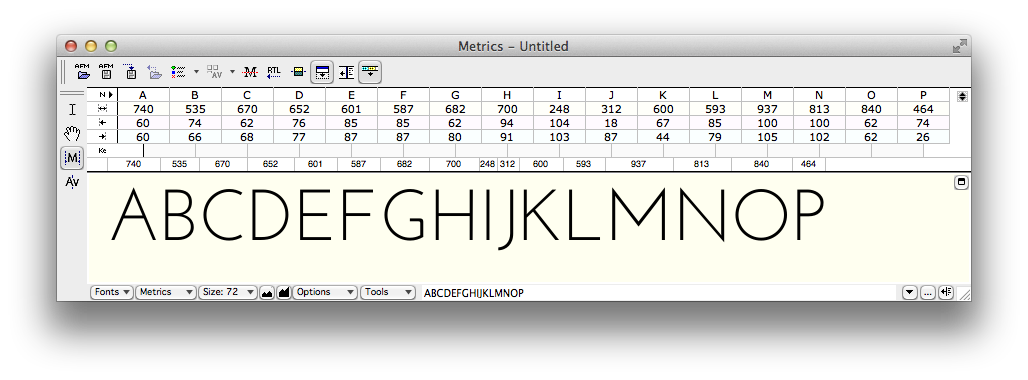
    picture of bad spacing
    Inconsistent treatment of sidebearings makes this geometric sans serif typeface less useful. (click for full-​res image)
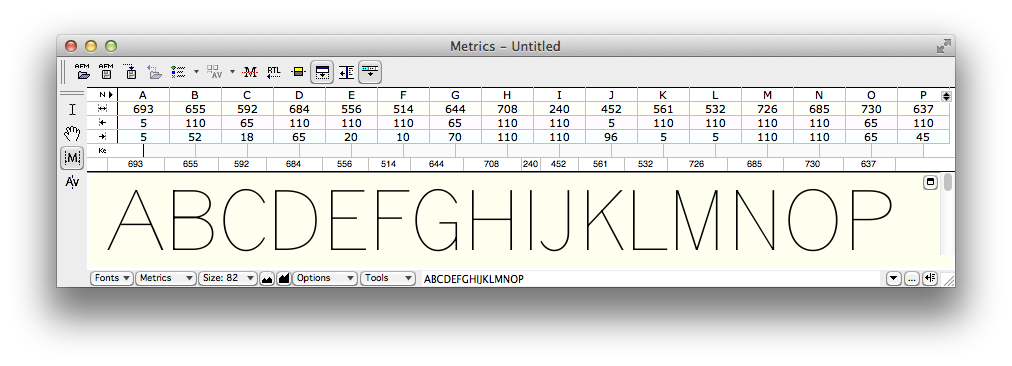
    Passable spacing image
    Consistent and reasonable (if uninspired) spacing in a sans serif font. (Click for full-​res image.)

    ADDED: Here is a video tutorial I did on spacing.


    Kerning

    The word “kerning” can refer to any of three things:

    1. noun: data in a font that adjusts spacing for particular letter combinations.
    2. verb: the act of creating such data
    3. verb: when setting text, the act of adjusting space between particular letters in text. This is an operation done by a typesetter in text setting software, and is not a font editing operation. Also, not to be confused with tracking, which is adjusting the overall spacing of a block or range of text all at once.

    For purposes of this article, I’m concerned with the first two definitions: kerning data built into fonts, and how to create that data. We’ll get to the “how” later, first let’s talk about the “what.”

    It’s critical that the basic spacing be done well in any font, but for particularly difficult combinations, the font should also contain built-​in kerning (which can help avoid the need for the end user to do manual kerning). Kerning is a set of adjustments to the default spacing for specific troublesome letter combinations, so as to deal with fact that, without intervention, “AV” will be set too far apart, or that in some fonts “f)” will make the top terminal of the f collide with the parenthesis. Vast amounts of kerning are not always a necessity for a well-​made font, but if there is no kerning, or if it does not deal with common situations like “LT” and “To”. . . then there is something wrong.


    Making Kerning

    In the “old days” prior to about 10–15 years ago, kerning was done by defining pairs and adjusting the spacing. So combinations such as To and Te would be separate pairs, as would VA and WA. This was a pain, but still manageable as long as fonts still only have <256 glyphs per font, although some would end up with thousands of kerning pairs, and some apps would break (in different and interesting ways) when working with very large amounts of kerning data.

    But it is not unusual for an OpenType font to have a thousand glyphs or more. Cristoforo Regular has 1324 glyphs now. Luckily, OpenType allows for “class kerning,” in which glyphs can be grouped into classes, and then the classes are kerned instead of individual glyphs.

    So the first thing to do is to define those kerning classes! I spent days on and off just doing that for Cristoforo Regular. Some of them only apply when the class is on the left, some when the class is on the right, and a few apply to either side. I had 96 kerning classes before I started kerning. I made a few additions and deletions during the process, and am sitting with 101 right now, with 632 distinct adjustments between classes (the class equivalent of “kern pairs”). Probably a week or more of work, if it was full time.

    Here’s the display of classes in FontLab Studio 5.1.4. Most of my classes for Cristoforo have anywhere from 4–30 glyphs, but some have just one or two, and the largest has 84.
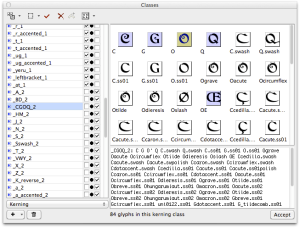
    Kerning class definition in FontLab Studio 5.2 (image)
    The left listing has all the classes, along with whether they are left side, right side, or both. The selected class is a left side class, composed of capital letters with round left sides, such as CGOQ. (Click for full size image.)

    Getting the class definitions right is critical. If a glyph is missed out, it doesn’t get kerned. If a glyph appears in two left-​side or two right-​side classes, it causes an error that means that a bunch of the kerning will never be applied when the font is used. (FontLab Studio warns appropriately, but debugging can take a while.)

    Here is how the spacing can be viewed with arbitrary strings of text in the metrics window. At the moment the effect of kerning is not being shown.
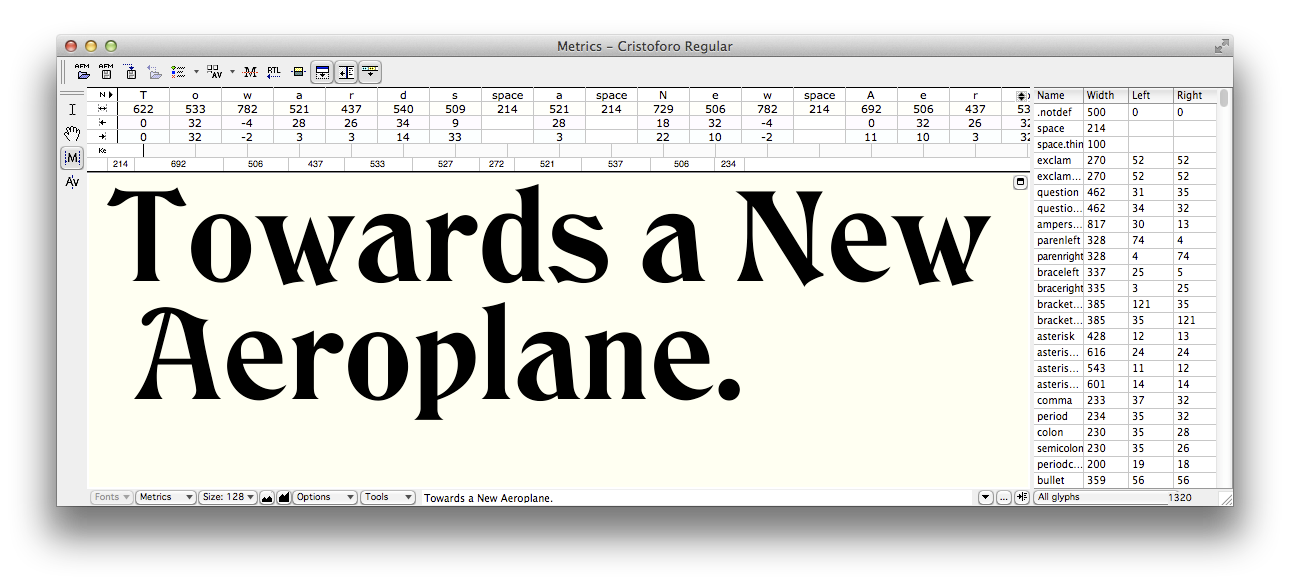
    unkerned text image
    FontLab Studio metrics window showing advance widths and sidebearings for unkerned text. (Click for full size image.)

    Below you can see the same text only with kerning applied.
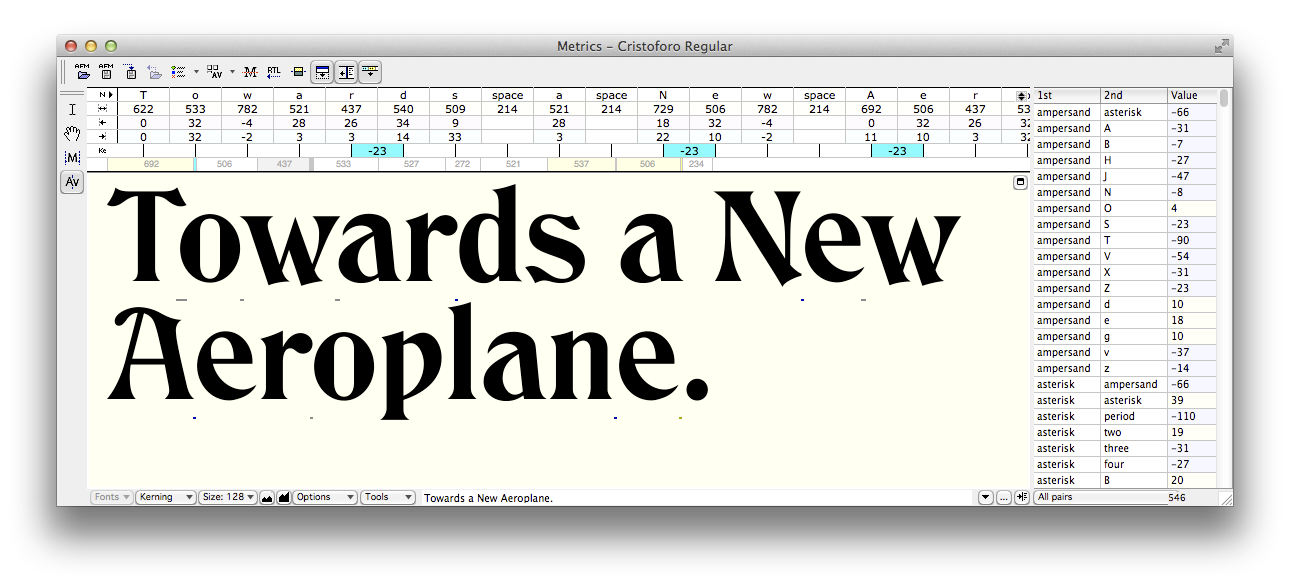
    Kerned text
    Effects of kerning are shown. The metrics listing above the text only shows those pairs for which both members are considered the primary exemplar; other combinations are often kerned as a result of class membership. (Click for full size image.)

    The next version, below, highlights the points where kerning is happening. Mostly kerning makes the combinations closer together, except the “e.” combination, where the period has to be moved a smidge further away.
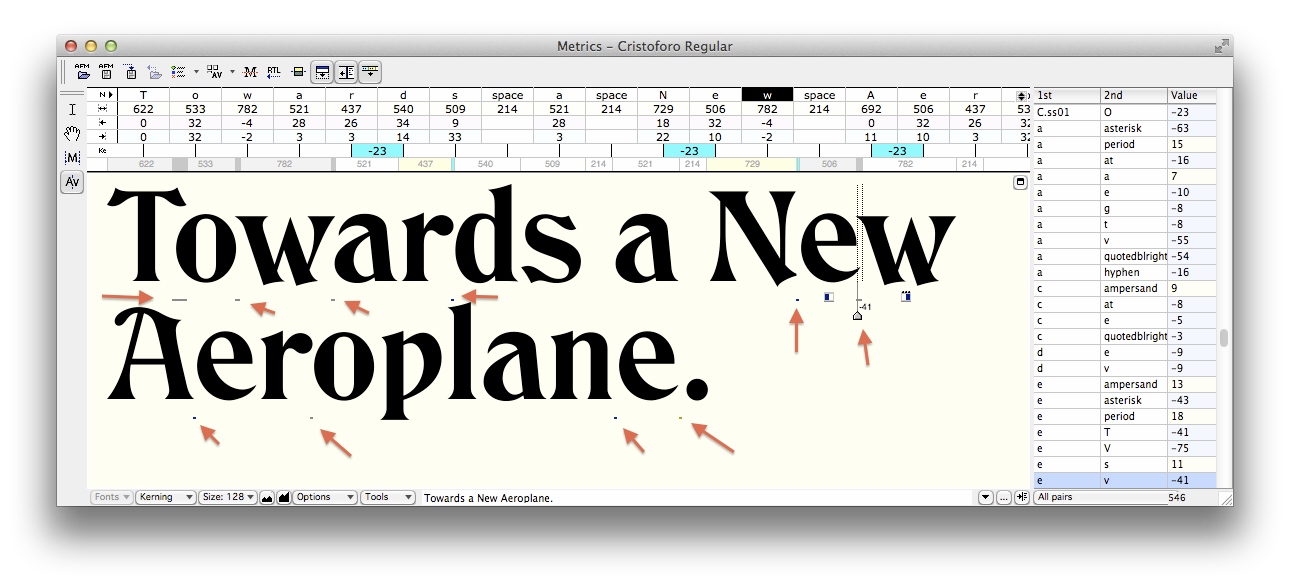
    Kerned text annotated
    FontLab Studio metrics window showing advance widths and sidebearings for unkerned text. (click for full size)


    Application Support

    Most graphics and publishing apps simply use the kerning data in the font by default. You have to do something special to avoid it or get different results. This is true of Photoshop, InDesign, Illustrator, and QuarkXPress.

    The Adobe apps refer to the kerning built into the font as “Metrics” kerning, as opposed to no kerning or Adobe’s automatic “Optical” kerning. In a well-​made font Metrics kerning produces the best results, but even then Optical kerning can be handy for combinations the type designer missed, or situations that can’t be handled by kerning built into the font (such as kerning between different font sizes or two entirely distinct fonts).

    Even WordPerfect, back around 1990, had kerning on by default, if I remember correctly. But not Microsoft Office.

    Microsoft Word has allowed you to turn on kerning pretty much forever, it just defaults to being off. To turn it on, in recent versions, go to Format > Font or hit Ctrl-​D (Cmd-​D on Mac). You’ll get a big dialog. Select the “Advanced” tab.

    Then in the top “Character Spacing” section, check the box that says “Kerning for Fonts.” The default is to set kerning on for 12 point and above, but you can reduce it—I generally set it to 1 point because I want kerning on all the time. Unless I am writing an article about kerning I never want it off.
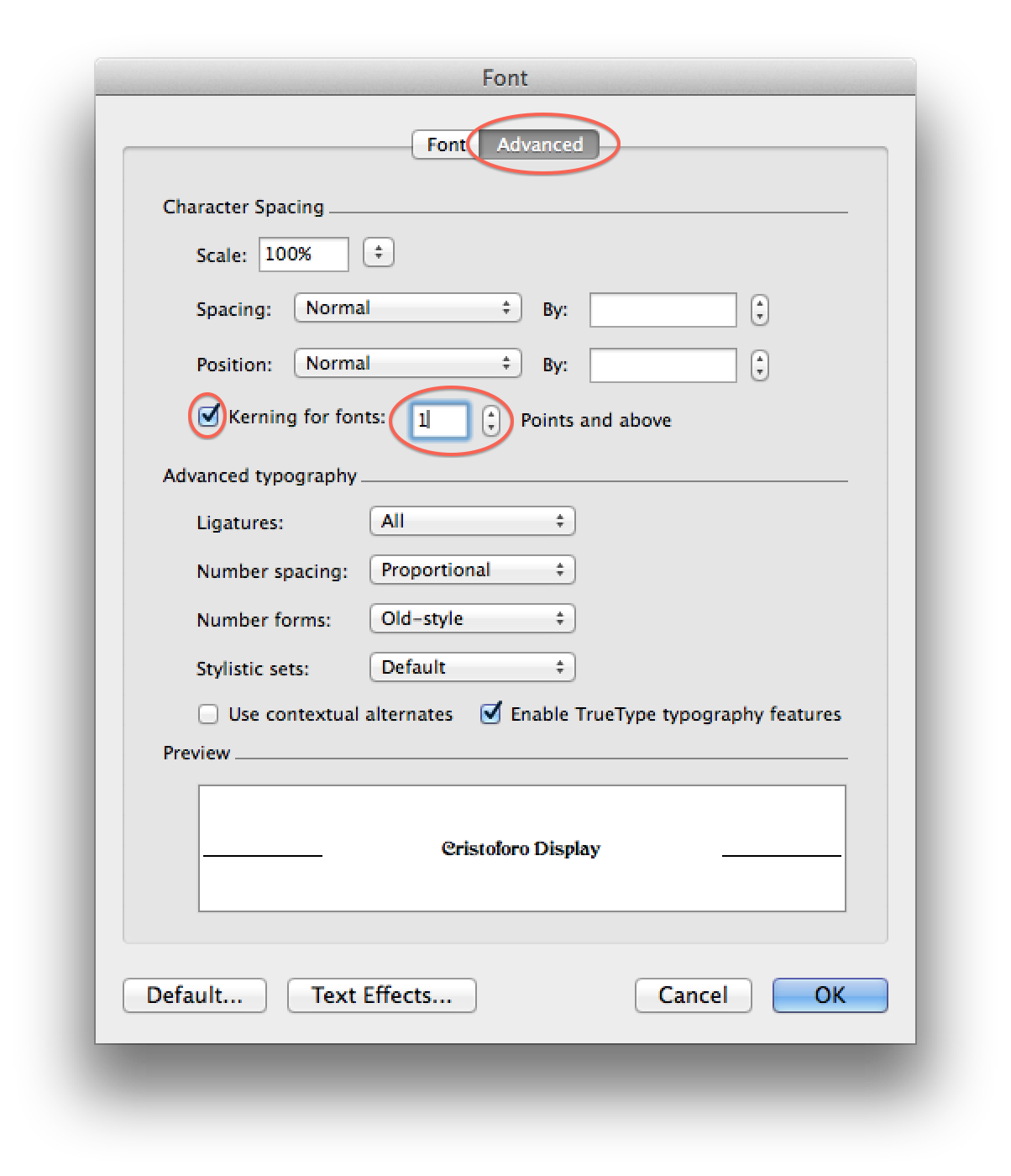
    Word kerning dialog
    Kerning dialog in Microsoft Word 2011 for Mac (Word 2010 for Windows is similar)

    PowerPoint has more recently started supporting kerning. In more recent versions, go to Format > Font or hit Ctrl-​T (Cmd-​T on Mac). In the resulting dialog select the “Character Spacing” tab. Then check the “Kerning for fonts” option.
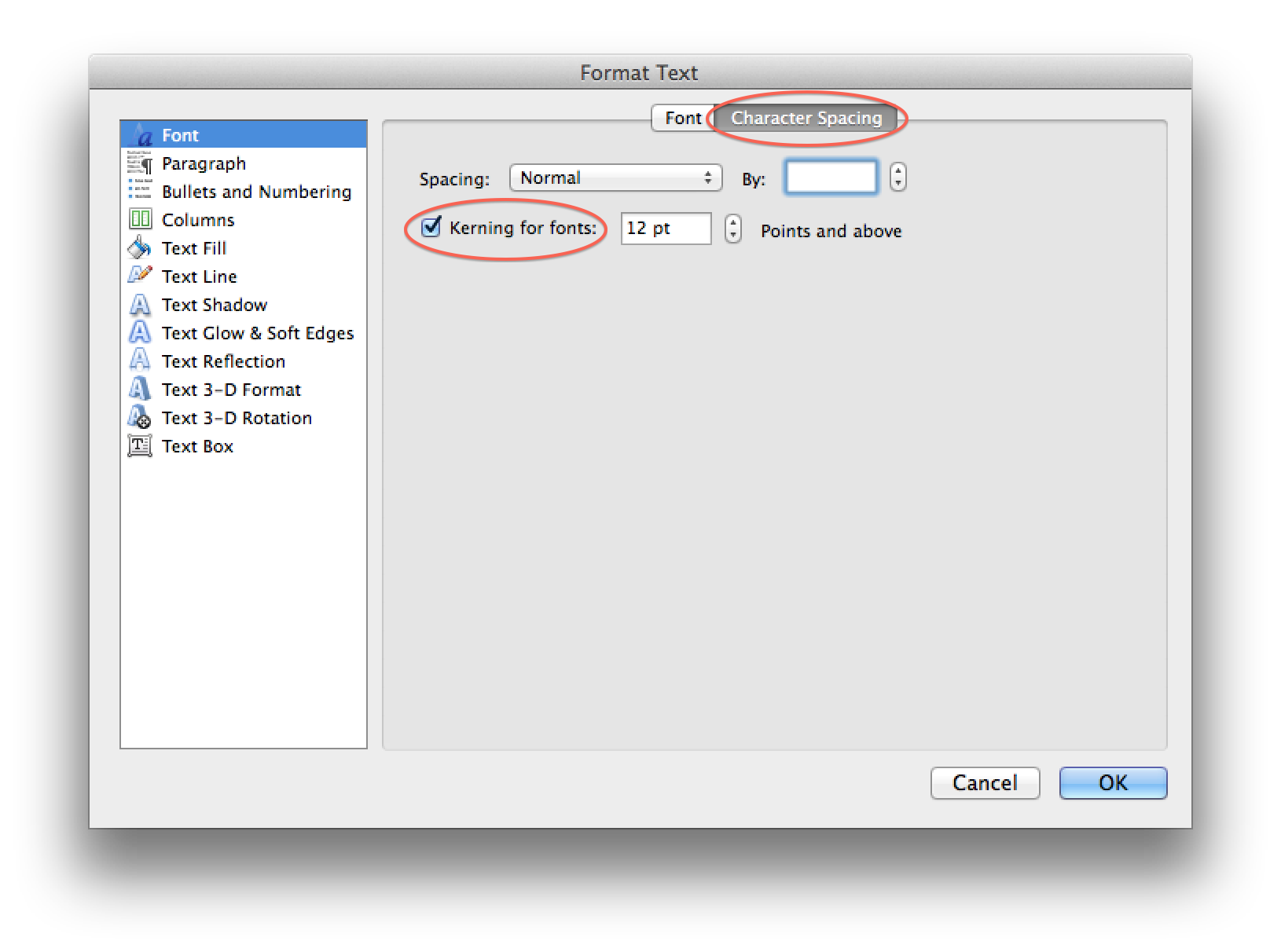
    PowerPoint kerning dialog
    Kerning dialog in Microsoft PowerPoint 2011 for Mac (PowerPoint 2010 for Windows is similar)

    So that’s all you need to know to use and appreciate kerning!

    NOTE: About 1/​4 of the text of this post is borrowed from my article “Know If a font Sucks,” currently in press for the March–April issue of Communication Arts.

  • Intro Type Design Workshops in New York & Singapore

    I had so much fun doing this in Portland, that I am again joining Dave Crossland (pending sufficient registrations) to teach a 2-​day intro type design workshop in New York City at Columbia University’s School of Journalism, July 20–21.

    We have essentially a loose anarcho-​syndicalist collective, organized by Dave under the “Crafting Type” banner. Doing this in a tag-​team format turns out to be amazingly effective and fun. Dave comes from a very different perspective than I do in some respects, but we share our love of type and type design. Students really benefit from a variety of viewpoints and expertise.

    The Singapore Crafting Type workshop is July 17–19, being taught by Eben Sorkin and Octavio Pardo. They too are knowledgeable instructors with varying perspectives, and it should be a great opportunity! 

    Here again is some of my own work:

    Hypatia Sans poster style sample

    Hypatia Sans poster on Adobe’s site, click for high-​res PDF.

  • Crafting Type” intro font design workshop in Portland

    I am joining Dave Crossland and other type designers (depending on registration levels) to teach a 3-​day intro type design workshop here in Portland at the Pacific Northwest College of Art (PNCA). I am really looking forward to this, even if I don’t know that I can live up to the hype from the initial teaser post about it. But I love type, and I have spent a lot of time thinking about how to teach the basics of type design. I am looking forward to helping do that in a workshop environment, and doing so with other instructors so we can divide up the material, and even dynamically discuss things in front of the class. Dave comes from a very different perspective than I do in some respects, but we share our love of type and type design.

    Thanks to Paul Platosh at PNCA for helping make this happen!

    Here is some of my own work:

    Hypatia Sans poster style sample

    Hypatia Sans poster on Adobe’s site, click for high-​res PDF.

  • Obscure PANOSE issues for font makers

    For a long time I thought of the PANOSE numbers in fonts as only used for things like font matching, without any practical impact in most day-​to-​day use of fonts. I am reminded this week of how dangerously wrong that belief is.

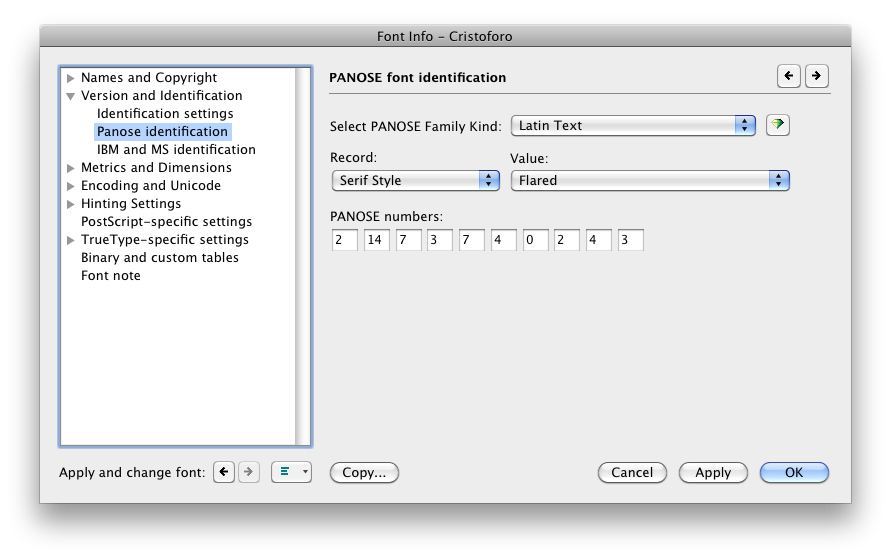
    For those who are unfamiliar with it, the PANOSE number of a font is a chunk of metadata that describes the font with a sequence of digits, an encapsulated description. Here’s the PANOSE section in FontLab Studio’s Font Info pane.

    PANOSE settings in FontLab Studio 5
    PANOSE settings in FontLab Studio 5 (click for full size)

    This week, for the second time in the past 15 years, I discovered a WIndows font bug caused by improper PANOSE numbers in fonts, which I had never heard of before.

    The first bug was simple: if you set the appropriate PANOSE digit to say the font is monospaced, Windows will ignore the actual advance widths in the font and treat every glyph as having the same advance width. This means that you had better not set the PANOSE to monospaced unless the font is utterly and completely monospaced. This may seem simple, but consider that some supposedly-​monospaced fonts still have ligatures. If, say, the fi ligature is to have a different width than the i by itself, then the font is not truly monospaced and setting the PANOSE to monospaced will mess up that glyph’s advance width (at least, in many Windows applications, though not most Adobe apps).

    If my understanding is correct, the new bug is also simple: if you have a style-​linked family such as a regular and an italic, the general PANOSE class had better be the same for every family member, or else Windows will get very confused. In my case, the regular was of the “Latin Decorative” class and the very early build of the italic was “Latin Text” (because I hadn’t bothered developing the PANOSE number yet for the italic). Some very odd symptoms occurred for a user with an existing document in Word 2010 on Windows 7.

    This is also a lesson in font testing. Even something as simple as coordinating family members for Windows, a mostly well-​understood area, and one in which I have considerable expertise, can fail for unknown reasons. There is no substitute for actual testing in apps: this issue was not identified by Adobe’s fabulous CompareFamily test tool, probably because they had never encountered it. I had used the italic by itself in Word on Windows, and both the fonts together in Creative Suite apps, and all was well. That was simply insufficient.

    Definitely a major error on my part. Certainly, this was not a final release, but even a pre-​alpha build released to my Kickstarter backers, as the new italic was, should behave more reliably than this one did.

  • Conferences & Cristoforo

    Wow, it has just been a crazy time lately. I wrote most of this yesterday at 36,000 feet, on my way home from a quick tour of Europe for work: Barcelona, Paris, Hamburg and Munich. This included numerous customer meetings and three speaking engagements:

    My “Type Detective” talk at Typo Week Barcelona

    Now I have a break for a couple of weeks before my next conference, TypeCon in Milwaukee (Aug 1–5), where I’ll host a panel to talk about Kickstarter as a means of funding new type design. I’ll also be doing a talk on the same subject at ATypI in Hong Kong (October 11-15).

    In the meantime, I have been hard at work in my off-​hours on my Kickstarter-​backed typeface, Cristoforo, with help from my fabulous intern, Andrea Harrison. The full details are available to my backers in an update on Kickstarter, but for public consumption, I’ll just say that work continues on the upright face, and has started on the italic, and I am predictably enough wishing that I hadn’t promised to add so much language coverage (central European, Greek, Cyrillic). But it’s coming along, and the extended language support offers some greater design challenges than just digitizing an old typeface.

    My day job has kept me pretty busy, and has presented me with some one-​sided decisions. Gee, I have exactly one day free in Paris: work on Cristoforo, or visit the Louvre? Okay, so I’m probably not going to collect a lot of sympathy votes here. But after spending less than 48 hours in each of Paris, Hamburg and Munich, then flying back to Portland, I am pretty beat.

    Finally, I need to thank my backers for Cristoforo! Without them I would not have tackled the typeface, or would have done something much less ambitious and done it more slowly. Here is the backer listing (and yes, some of these are pseudonyms, it’s whatever they use on Kickstarter).

  • Cristoforo Backers

    As I’ve been posting about lately, Cristoforo is a family of three fonts I am developing, reviving Columbus & Columbus Initials (Ihlenberg, 1892) and American Italic and American Italic Initials (Ihlenberg, 1902) as well as adding a symbol font. I am the lead designer, with the assistance of my new intern, Andrea Harrison.

    I funded the development of Cristoforo through a Kickstarter campaign, which raised over $10,000 from backers. Woot!

    Current ETA on finished fonts? February 2013. However, limited pre-​release versions will be available to appropriate levels of backers starting in mid-July.

    Here are my awesome backers, in tiers by their level of support.

    Elder Gods

    Gerry Leonidas
    “Hanover Fiste”
    Laura Worthington
    Lanny Maude
    Michael Grzesina

    Great Old Ones

    Daphne Pfister
    Andrew Leman
    Adam Crossingham
    Andy Watson
    Harbs
    Dorian Henao
    Christian Mayland
    Philip M. Payes
    Sean Stewart
    Mark Simonson
    Eric Menninga

    Greater Servitors

    Steve Burnett
    Owlglass
    Shaun Huston
    Robin Layfield
    Alan Shutko
    M Sean Molley
    John Butler
    Juris L. Purins
    Ned Holbrook
    John Bragg
    Jens Kutilek
    Ed Hurtley
    Dean EngelHardt
    Shaun Huston
    Jens Kutilek

    Unspeakable Horrors

    H James Lucas
    Rachael Stevens
    Katherine Schroeder
    anarch
    Sarah E Canzoneri
    Tom Orzechowski
    Atarun
    Alexander Y. Hawson, M.D.
    jshallri
    Adam Jury
    Matt Goczalk
    Eric Schild
    Michael Mellinger
    Genghis Kern
    Tom Carlson
    Josh Rensch
    Justin Hernandez
    Joerg Sterner
    Kimlin
    Emrys Hopkins
    Jonathan Biddle
    Bobn Gorski
    trit
    Bret Kramer
    David Marshall
    Melissa Bube
    Christopher
    Trampas Johnson
    John Velonis
    Alan Ackerman
    Bruce
    Jonathan Harnum
    Brendan Sheehan
    Val Lucas
    Shelby Cinca
    Solarom
    Damon Loren Baker
    Gene Breshears
    Shabier Raffee
    Battlefield Press, Inc.
    James Hannum
    Adrian Rector
    Stephen Kick
    Eric Havir
    Trevor Stamper
    Open Design
    Marc Teppo
    Ben Levy
    Jim Ramsay
    Luke Ovitz
    Rick Ernst
    Seth Godin
    Reed Savory
    Frédéric Gaudet
    Skye
    Steven Scherbinski
    Ed Possing
    Simon Rogers
    Rob Kaughan
    Filipe
    Steve Huntsberry
    Bugmaster
    Christine Doyle
    Gerald Saul
    Raymond Michaud
    Peter Miller
    Fred Hicks /​ Evil Hat Productions
    Brett Bozeman
    Bryant Durrell
    Mike
    Mark Ho-Kane
    Derek M. Koch
    James Todd
    Bill Walsh
    chris
    Mark L Pappin
    Chris Huning
    Michael Jacob
    Dan Reynolds
    Rod McDonald
    Gerolf Nikolay
    David Wolske
    John Hawkinson
    Galahad de Corbenic
    Justin Unsworth
    Rob Pinkerton
    Tom Conder
    Eric Nielsen
    Terry McKelvey
    David Occhino Design
    Jean-​Claude Tremblay
    Randy
    Chris Jarocha-Ernst
    Jason Williams
    Kate Eakman
    Richard Kegler
    Yukihiro Terada
    Robert “Rev. Bob” Hood

    Lesser Servitors

    Zachstar2014
    Jonathan Krell
    Alex Kim
    Torrain
    Scott Dorward
    Brien Croteau
    Brian Schoner
    Hans de Wolf
    Jon Michaels
    Andreas Welch
    Jessica Kozaki
    Benjamin Bangsberg
    Gerald Kowarski
    Blaine Horrocks
    Rob
    Knighthawk 2112
    Angela Patel
    Candace White
    Thomas Taimre
    Jeff
    Darin DuMez
    Antoine Bertier
    Jed McClure
    Stacey Van Keuren
    Maika
    Threemoons
    Jon N
    Rork
    Haakon Sjursen
    Tobias Svalås
    Andrew Lee
    James Allenspach
    Akma
    Rt Andrez Mora
    “Rambo”
    Curt Miyashiro
    Elliott C. Bäck
    Adam Hunter Peck
    Munchezuma
    Scott Morrison
    THomas W. Holt Jr.
    Dave Borne
    David Barton
    Nathan Clarenburg
    Mike Hurd
    Kathleen TInkel
    arfunk
    Candace Carpenter
    Brian Moe
    Micah Wright
    rampantbicycle
    Lila Symons
    Gem Newman
    Nikola Skopec
    Brandon Holfeltz
    Marcos Nogas
    Phil Vance
    Don Hosek
    Eric Eslinger
    Victor Hammersley
    Dennis Wilkinson
    Edward Iglesias
    Jeremy Tavan
    Adrian Rector
    _Zed_
    Christopher Harris
    Jorg Rødsjø
    Jeanette
    AH
    Mike Nutt
    Mitchell Olson
    Patrick Heagany
    Sean Molley
    Juan M. Escribano
    Wayne A Arthurton
    Brian Platt
    Steph McW
    Glenn Fleishmann
    Laura
    Ann Voelkel
    Jesse Garrison
    Michael Bowman
    H. James Lucas
    Raphael Solomon
    Marty Barnett
    Stephanie Schorr
    Pablo Impallari
    Dennis Kelley
    Tieg Zaharia
    Ernst Tedeschi
    Dougal Campbell
    Lorenz Thor
    Halstead York
    Ian Lovecraft
    Richard Simon
    Rebecca Evans

    Byakhee

    Ezra Claverie
    Samuel Velasco
    Daniel Steinbock
    Lori

    Ghouls

    Missa
    Justin Marsten
    Michael Gerber
    Steven Zeck
    Alisha
    Josh M
    Caleb Stokes
    Nicholas
    Karen Babyak
    Alex
    Jenny Franck
    Julian F
    James Turnbull

  • Cristoforo $10K Promo: Free Dark Symbols Font

    With about 48 hours to go (midnight Sunday PDT), my Cristoforo font project on Kickstarter is at about $9,300 in pledges from backers who want to get cool fonts and other swag. As $10,000 is my final “stretch” goal (the point at which I add Cyrillic support to the fonts), I was trying to decide how to both celebrate and encourage the last few pledges I need. I settled on releasing a free font that might be of interest to some H.P. Lovecraft /​ Cthulhu fans: Dark Symbols icons designed by Brennen Reece and Graham Walmsley, fontified by me, released at no charge under the Open Font License 1.1.

    Dark Symbols sample

    Download Dark Symbols font (Zip archive of .otf).

    What are the Dark Symbols? Graham explains them on his blog, but basically these are rough-​edged hand-​drawn symbols, intended for folks to mark up Cthulhu-​related role-​playing adventures.

    I may also incorporate the Dark Symbols in my Cristoforo Symbols font; that’s TBD. But in any case, enjoy this free font, and consider supporting Cristoforo in its waning hours on Kickstarter!

  • Should Dyslexics Unite on a Typeface?

    The current issue of Communication Arts has an article I wrote on a couple of recent attempts to make special fonts for dyslexics, entitled “Should Dyslexics Unite on a Typeface.”

    Although the print magazine reaches a huge audience (yay!) it does impose serious space limitations. It also has a big lead time. I thought I would add a couple of possibly relevant thoughts here, as well as a new research link. Also, the online version of the article makes the graphics a bit small—here is a PDF you can zoom in on.

    Here’s some new research showing that more generous letterspacing and line-​spacing together can make text easier to read for dyslexics.

    My biggest criticism was that despite some valiant attempts at testing, there was no evidence that these fonts really were any more functional in terms of reading than other reasonably legible fonts. Heck, they couldn’t prove that these fonts were significantly better than freakin’ Arial, which is a fairly low bar to clear in terms of improved legibility. (Not a slam against Microsoft, btw. They have sponsored both highly legible fonts such as Verdana, and lots of research on legibility. But neither Arial nor Helvetica is a great legibility typeface.)

    One thing I didn’t get into in the article was that they could have chosen other things to measure besides the traditional reading speed and comprehension measures. Those are easily measured, but they are not very subtle. One really has to have a very large sample size of readers, or hose the typography pretty seriously, to impact those measures to a statistically relevant degree. People can read gothic blackletter without all that large a decrease in reading speed, but they sure don’t like it for running text.

    Perhaps I am a bit hasty to discount simple user preference as a factor. But I am more interested in the actual impact on the reading experience and on people’s lives rather than what people say if queried afterwards. Luckily, there are things one can measure that get at this more directly than stated preferences, while still being a bit more subtle than reading speed and comprehension. I covered these in a previous article for Communication Arts, “How to Explain Why Typography Matters.” Check out the last few paragraphs on the second page, where I talk about measures like corrugator muscle activity (how much people wrinkle their brow), tension of the orbicularis oculi muscles (used in blinking, squinting and frowning), and even performance on creative tasks following a reading experience (it improves with better typography, even if that typography doesn’t impact reading speed or comprehension).

  • Cristoforo lives! Re-​launched Kickstarter project & revised intern position

    Cristoforo promo image

    If at first you don’t succeed….

    My first go didn’t quite make it, so I reconfigured the reward structure and relaunched my Kickstarter campaign to find backers for my new typeface, Cristoforo, a revival of some classic Victorian typefaces by Hermann Ihlenburg. It’s also known as the typeface of Call of Cthulhu (the H.P. Lovecraft roleplaying game), and as the original logo for Cracker Jack. The campaign will only last until midnight on Saturday June 17. Basically, people pledge money up front for the fonts (and other goodies) so I know the project is viable. Reward options for backers depend on their funding level, and include not only the fonts, but computer desktop wallpaper, T-​shirts and posters.

    Kickstarter is all or nothing. Only if the total pledges exceed the minimum funding target are people’s credit cards charged and the project moves forward.

    If funding exceeds the minimum by enough of a margin, I can add more language support for central/​eastern Europe (including Cyrillic), and even pay an intern! Otherwise, the intern will be an unpaid position. I hope to make intern decisions in a week, and just revised the job description again.

    Check it out the typeface on Kickstarter and/​or my intern wanted posting.